Securing Linux Distros Part 1

Downloading and installing new Linux distros is easy, pull an .iso from a distribution hub to deploy and within 10 minutes you've got a new machine. When it comes to securing Linux, that can be much more difficult. We can start to lockdown and secure the general operating much like any other OS with the following areas: Securing the boundary, permissions, users, and default settings.
Examples here will just be for Ubuntu Server Distro: https://ubuntu.com/download/server
By default, the Linux server you may download today has a lot of secure defaults enabled. These may include file permissions to key files, sudo, and many other settings that just considered "normal" by today's standard. Some of these settings may not be enabled if you are dealing with older legacy systems, and depending on your environment may not even be possible to update but with all things in the security field it's about trying to be as good as possible with interlaying layers of defense.
Boundary Securing
Same as any OS we can start by enabling the Firewall, since Ubuntu doesn't start with it on by default, we'll have to enable it, and ensure some secure defaults:
Enabling the Firewall:
sudo enable ufw
Default Deny all incoming:
sudo ufw default deny incoming
Default Allow all incoming:
sudo ufw default allow outcoming
Now we will add the SSH to the allow incoming list:
sudo ufw allow 22/tcp
Now that we have our Firewall setup let's start clamping down on some of the unsecure defaults
OpenSSH is a great tool for remoting into Linux machines, but can leave them vulnerable to brute force attacks if not setup correctly, lets start by making sure the root account cannot be used as a login
For SSH Server make sure your service is up and running, granted you have it installed
sudo service ssh status
When you get that active you'll then need to get into the config file and make some changes
sudo vim /etc/ssh/sshd_config
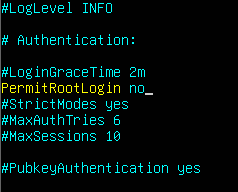
Make sure you save the config after editing!
This should make it so root cannot be used to SSH into this server, but let's implement something to prevent and timeout any potential brute force attacks!
Fail2Ban is a simple but effective program that logs and blocks connections that meet its criteria
First we will download and install Fail2Ban
sudo apt install fail2ban
Now that we've installed fail2ban lets change the config by making a local copy first and do some editing!
sudo cp /etc/fail2ban/jail.conf /etc/fail2ban/jail.local
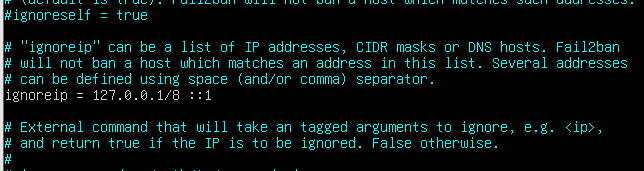
sudo vim /etc/fail2ban/jail.local
We can change some of the defualt setting we want but just by implementing this we've already setup a catch for brute force attacks, just to be extra safe lets add a measure to ignore my IP for Fail2Ban so I don't lock myself out
Part 2 can be found here: LINK