Setting up Graylog for Docker

Graylog is an awesome Network Logging Aggregator used to store all sorts of logs from a multitude of devices, I've used it to log Windows Servers, Firewalls, and Linux Machines. In this guide I will walk through the installation process and how to add such devices.
First you should have a cleanly installed Ubuntu server such as stated in my other posts. Then install Docker and confirm it is working.
Setting up the actual Docker installation is pretty easy, you just need to go to https://github.com/Graylog2/docker-compose to grab the latest in images, you'll want to grab the open-core compose and .env files. Make a folder, under the home directory for the current user is fine and create two files, one for the compose and one for the .env file. For the .env file you'll have to create two passwords which are done by doing the instructions on the copied .env file.
Once completed you can start docker for the first time by pulling and running:
Pull the packages
sudo docker compose pull
Once completed you'll have to run it the first time
sudo docker compose up -d
Once the docker runs it may complain and tell you to setup initial config, to get the initial config password you'll have to pull it from the logs
sudo docker compose logs
Once the docker image is up you can browse to the address in your web browser, for example if your server is 10.10.10.10 then the address should be https://10.10.10.10:9000, the login should be admin and the password should be the one set in the .env file.

Once the website is up, you'll want to create your first inputs! We'll create a new input for default syslog messages. From System -> Inputs -> Select the Syslog UDP then Launch new input to setup the config.
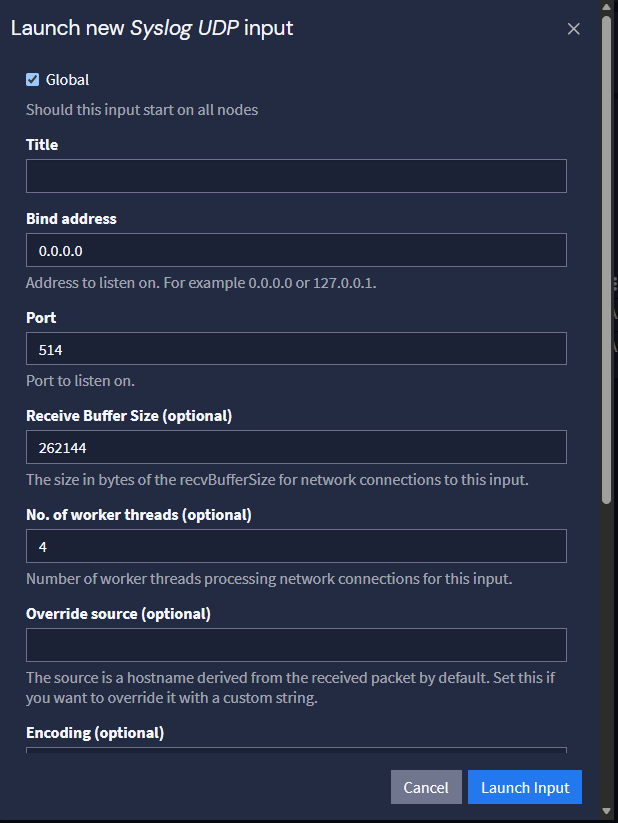
If you are going to use a custom port make sure you make note of it for the Docker image, you'll have to update the docker ports for Graylog to allow that specific port to communicate with the image. Same warning goes for when you want to implement ufw, you'll have to specifically allow that port as well as the normal port of 514.
Next you will want to configure your device to send syslog logs. In my environments I have my firewall and servers setup to use Graylog. The firewall typically use a syslog with a custom port (which you can configure the same way but change the port) and servers through a use of sidecars, which are programs used to communicate logs to Graylog, and more syslog.
Lastly for this how-to we will do our first filter of our logs. For this example, I added a firewall and now receiving logs. From the search we can filter using basic syntax, in this example I want to show all logs from our firewall that contain the word "failed".
source:fg200f AND message:"failed"
This will display everything given our last request.
We covered Graylog and how to setup and initially use it! Graylog is a great tool for small/medium districts that want visibility and accountability centralized in one location. By adding more controls and security this can become a great and reliable tool to determining malicious activity!